[Unitree Go2 part 0] Unitree Go2와 Unitree ROS2 구조 분석
Unitree Go2에서 강화학습 policy를 deploy하기 전에 알아야 하는 하드웨어, Unitree SDK2, DDS, Unitree ROS2, lowstate, lowcmd 구조를 정리한다.
1. 왜 Part 0이 필요한가
이 시리즈는 원래 Unitree Go2를 실제로 걷게 만드는 과정에서 시작했습니다. Part 1에서는 바로 Isaac Sim에서 policy를 학습하고 real robot에 deploy하는 이야기로 들어갔습니다. 그런데 글이 쌓이다 보니 계속 같은 단어가 반복됩니다.
1
2
3
4
5
6
7
8
9
10
Unitree SDK2
Unitree ROS2
DDS
/lowstate
/lowcmd
/cmd_vel
sport mode
policy action
target joint position
reported actuator temperature
이미 로봇 제어를 해본 사람이라면 대충 감으로 따라올 수 있습니다. 하지만 처음 보는 입장에서는 질문이 생깁니다.
“ROS2를 쓰면 되는 거 아닌가?”
“왜 /lowstate를 계속 봐야 하지?”
“policy가 action을 내면 바로 로봇이 움직이는 건가?”
“Unitree SDK2와 Unitree ROS2는 뭐가 다른가?”
이 질문을 정리하지 않고 바로 Sim2Real로 들어가면, 뒤에서 생기는 문제들이 전부 뜬금없어집니다. 그래서 Part 0에서는 Go2를 강화학습 실험 플랫폼으로 보기 위해 필요한 시스템 구조를 먼저 정리합니다.
이 글의 핵심은 하나입니다.
Unitree Go2에서 강화학습 policy를 deploy하려면 단순히 ROS2 topic을 publish/subscribe하는 수준을 넘어서, SDK2/DDS 기반 low-level state와 command loop를 이해해야 한다.
Unitree 공식 자료 기준으로 unitree_ros2는 SDK2와 CycloneDDS 기반 통신을 ROS2 message로 사용할 수 있게 해주는 구조입니다. 공식 README에서도 SDK2가 CycloneDDS 기반 통신을 구현하고, ROS2도 DDS를 통신 메커니즘으로 사용하기 때문에 Unitree robot의 하위 통신 계층이 ROS2와 맞물릴 수 있다고 설명합니다.
이 말은 편하면서도 위험합니다. 편한 점은 ROS2 topic처럼 접근할 수 있다는 것입니다. 위험한 점은 ROS2 topic이 보인다고 해서 실험에 필요한 모든 데이터가 자동으로 정렬되고 저장되는 것은 아니라는 것입니다.
이번 글은 그 차이를 정리하는 글입니다.
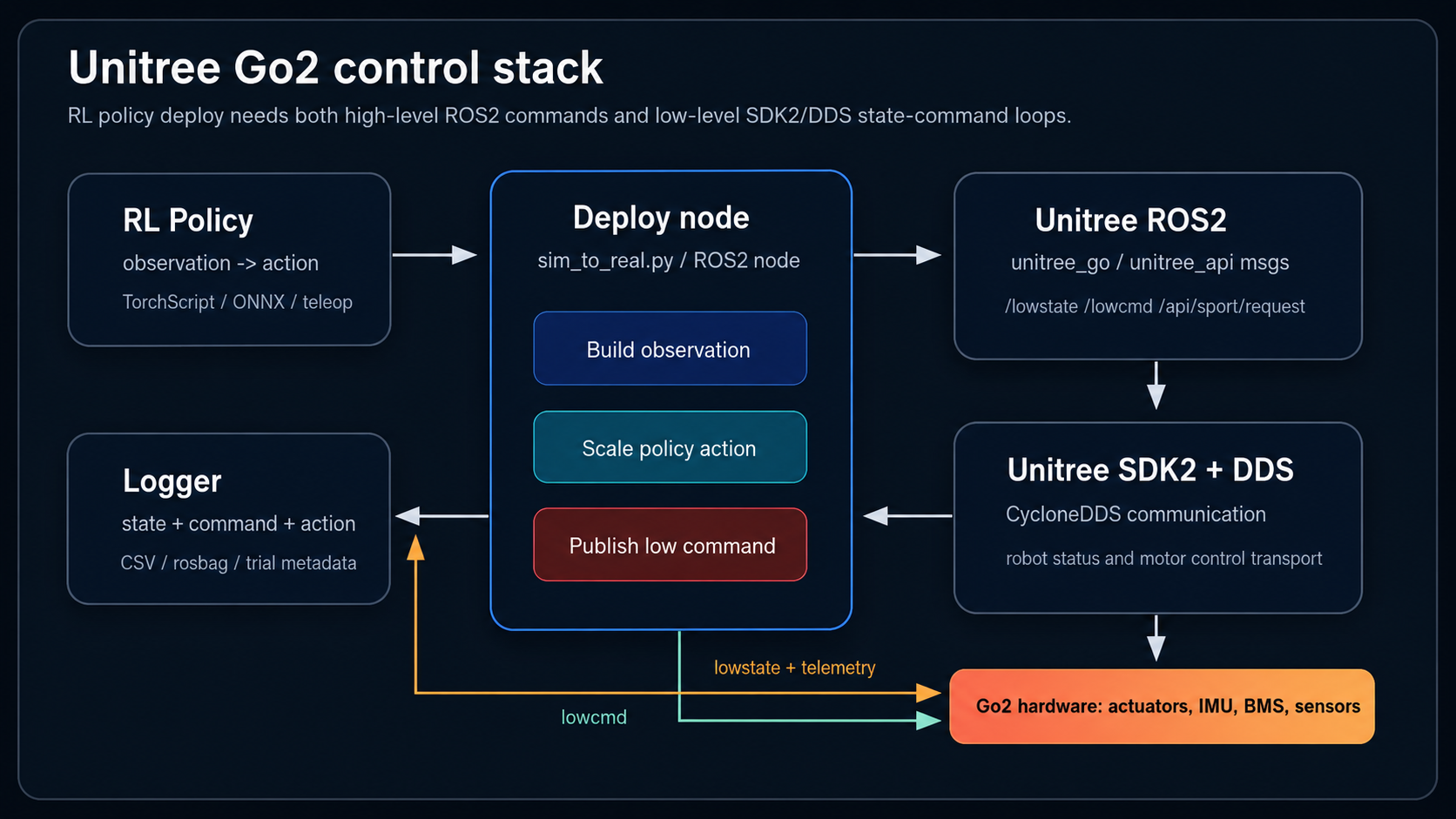
2. Unitree Go2를 어떻게 볼 것인가
Unitree Go2는 단순한 장난감 로봇개가 아니라, onboard computer, motor controller, IMU, battery/BMS, network interface, perception sensor를 가진 quadruped robot platform입니다.
공식 Go2 페이지 기준으로 Go2 계열은 12개의 leg joint motor를 사용하고, 모델에 따라 8-core computing module, 4D LiDAR, depth camera, smart battery, Wi-Fi/Bluetooth/4G module 같은 구성이 붙습니다. 최대 joint torque나 battery life 같은 수치는 모델과 조건에 따라 다르므로 논문이나 실험 글에서는 “대략 이런 하드웨어 계층이 있다” 정도로 보는 것이 안전합니다.
내가 이 프로젝트에서 보는 Go2는 다음 네 계층으로 나뉩니다.
| 계층 | 역할 | 실험에서 중요한 이유 |
|---|---|---|
| Robot hardware | actuator, IMU, battery, BMS, sensor | 실제 동역학과 thermal/current response가 여기서 나옴 |
| Unitree firmware / service | sport mode, robot state, safety service | high-level command와 safety 동작을 담당 |
| SDK2 / DDS communication | robot과 외부 PC 사이의 data transport | low-level state와 command가 오가는 통신 경로 |
| Deploy code / ROS2 node | policy inference, logging, command publish | 연구자가 직접 수정하고 실험하는 영역 |
강화학습 관점에서 가장 중요한 것은 마지막 두 계층입니다. Simulation에서는 environment가 observation을 깔끔하게 주고, action을 넣으면 다음 state가 바로 나옵니다. 실제 Go2에서는 그 사이에 network, message format, control frequency, actuator response, firmware service가 끼어 있습니다.
그래서 real robot deploy는 이런 모양이 됩니다.
1
2
3
4
5
6
7
8
9
real robot state
  -> SDK2 / DDS
  -> ROS2 or Python SDK subscriber
  -> observation construction
  -> policy inference
  -> action scaling
  -> target joint command
  -> SDK2 / DDS
  -> robot actuator controller
이 loop가 안정적으로 돌아야 “policy를 올렸다”고 말할 수 있습니다. 단순히 model file을 실행했다고 deploy가 끝나는 것이 아닙니다.
3. High-level control과 Low-level control
Go2를 제어할 때 가장 먼저 나눠야 하는 것은 high-level control과 low-level control입니다.
High-level control은 로봇에 추상적인 명령을 보내는 방식입니다.
1
2
3
4
5
6
stand up
sit down
walk forward
turn yaw
set body height
velocity command
이 방식에서는 robot 내부의 locomotion service가 다리 trajectory와 actuator command를 알아서 만듭니다. 사용자는 “앞으로 가라”, “회전해라” 같은 명령을 보냅니다. Unitree ROS2에서는 sport mode 계열 API가 이쪽에 가깝습니다. 공식 예제에서도 /api/sport/request topic에 request message를 publish해서 sport mode control을 수행하는 구조가 나옵니다.
Low-level control은 더 아래로 내려갑니다.
1
2
3
4
5
6
joint target position
joint target velocity
target torque
Kp
Kd
motor mode
이 방식에서는 사용자가 각 motor에 가까운 수준의 command를 구성합니다. Unitree ROS2 README는 /lowcmd topic에 LowCmd message를 보내 motor의 torque, position, velocity control을 구현할 수 있다고 설명합니다. LowCmd 안의 motor_cmd에는 q, dq, tau, kp, kd 같은 값이 들어갑니다.
강화학습 policy deploy는 보통 low-level control 쪽에 더 가깝습니다. Policy는 “앞으로 0.3 m/s로 걸어라”를 직접 robot firmware에 맡기는 대신, 현재 observation을 보고 12개 joint에 대한 action을 출력합니다. 그 action은 target joint position 또는 residual target으로 변환되고, 최종적으로 /lowcmd 형태의 command로 나갑니다.
그래서 이 프로젝트의 핵심 loop는 다음에 가깝습니다.
1
/lowstate -> observation -> policy -> action -> target q -> /lowcmd
물론 실제 코드에서는 rt/lowstate, lf/lowstate, /lowstate처럼 topic 이름이나 prefix가 SDK/ROS2 bridge 설정에 따라 달라질 수 있습니다. 중요한 것은 이름 자체보다 역할입니다.
lowstate는 로봇 상태를 읽는 입구이고, lowcmd는 로봇에 low-level command를 보내는 출구입니다.
4. Unitree SDK2란 무엇인가
Unitree SDK2는 Unitree robot을 제어하기 위한 공식 SDK입니다. C++ SDK가 기본이고, Python interface인 unitree_sdk2_python도 따로 제공됩니다.
SDK2의 역할은 간단히 말하면 robot과 외부 program 사이의 통신 및 제어 API입니다. 공식 SDK2 repository는 CMake로 build하고 예제를 실행하는 흐름을 제공합니다. Python SDK2 README도 high-level status/control, low-level status/control 예제를 제공하며, network interface를 인자로 넘겨 실행하는 방식이 나옵니다.
예를 들어 Python SDK2 예제는 이런 식의 형태를 가집니다.
1
2
3
python3 ./example/high_level/read_highstate.py enp2s0
python3 ./example/high_level/sportmode_test.py enp2s0
python3 ./example/low_level/lowlevel_control.py enp2s0
여기서 enp2s0는 robot과 연결된 network interface 이름입니다. 내 실험 환경에서는 enp6s0 같은 이름이 나왔습니다.
SDK2에서 중요한 것은 “ROS2 package”가 아니라는 점입니다. SDK2는 ROS2와 별개로 robot과 통신하는 기본 계층입니다. ROS2를 쓰지 않아도 SDK2 Python/C++ 예제로 robot state를 읽고 command를 보낼 수 있습니다.
이 프로젝트에서 deploy script가 하는 일도 본질적으로는 SDK2 기반 통신 loop입니다.
1
2
ChannelSubscriber("rt/lowstate", LowState_)
ChannelPublisher("rt/lowcmd", LowCmd_)
즉 ROS2를 쓰든, Python SDK2를 쓰든, 결국 아래에는 Unitree message와 DDS 기반 transport가 있습니다.
5. DDS와 CycloneDDS
Unitree ROS2를 이해하려면 DDS를 피할 수 없습니다.
DDS는 Data Distribution Service의 줄임말입니다. ROS2도 내부 통신 middleware로 DDS 계열 구현을 사용할 수 있습니다. Unitree SDK2는 CycloneDDS 기반 통신을 사용합니다. 그래서 Unitree ROS2 package는 ROS2 쪽 DDS 설정을 Unitree robot과 맞춰주는 일이 중요합니다.
공식 unitree_ros2 README는 ROS2 Humble on Ubuntu 22.04를 권장 환경으로 적고 있고, RMW_IMPLEMENTATION=rmw_cyclonedds_cpp, CYCLONEDDS_URI 설정을 통해 robot이 연결된 network interface를 지정하는 예시를 제공합니다.
대략 이런 구조입니다.
1
2
3
4
5
6
7
8
9
10
11
12
13
source /opt/ros/humble/setup.bash
source ~/unitree_ros2/cyclonedds_ws/install/setup.bash

export RMW_IMPLEMENTATION=rmw_cyclonedds_cpp
export CYCLONEDDS_URI='<CycloneDDS>
  <Domain>
    <General>
      <Interfaces>
        <NetworkInterface name="enp6s0" priority="default" multicast="default" />
      </Interfaces>
    </General>
  </Domain>
</CycloneDDS>'
여기서 가장 많이 터지는 문제는 network interface입니다. Robot과 연결된 interface가 enp6s0인데 setup file에는 enp3s0가 들어가 있으면 topic이 안 보이거나, 보이더라도 통신이 불안정할 수 있습니다.
이건 사소해 보이지만 real robot deploy에서는 치명적입니다. Policy loop는 50 Hz 또는 그 이상의 주기로 state를 받고 command를 내보내야 하는데, network/DDS 설정이 흔들리면 observation도 command도 흔들립니다.
6. Unitree ROS2는 무엇을 해주는가
Unitree ROS2는 SDK2/DDS 기반 robot message를 ROS2 환경에서 사용할 수 있게 해주는 package입니다. 공식 repository 구조를 보면 크게 두 부분이 있습니다.
1
2
3
4
5
6
7
8
9
10
11
12
cyclonedds_ws/
  unitree_go
  unitree_api

example/
  read_low_state
  read_motion_state
  read_wireless_controller
  record_bag
  go2_sport_client
  go2_stand_example
  low_level_ctrl
unitree_go와 unitree_api는 message definition 쪽입니다. example은 실제로 topic을 읽고 command를 보내는 예제입니다.
내 관점에서 Unitree ROS2의 역할은 bridge라기보다 “ROS2-native하게 Unitree DDS message를 다루기 위한 환경”에 가깝습니다. 공식 README도 ROS2 message를 통해 Unitree robot과 통신/제어할 수 있다고 설명합니다.
하지만 여기서 오해하면 안 됩니다.
Unitree ROS2가 있다고 해서 다음이 자동으로 해결되지는 않습니다.
1
2
3
4
5
6
7
policy action logging
target joint position logging
command profile logging
base pose estimation
command tracking error
energy per meter
thermal trial segmentation
ROS2 topic이 보이는 것과 논문용 dataset이 생기는 것은 전혀 다른 문제입니다.
7. /lowstate: 로봇 상태를 읽는 입구
/lowstate는 real robot에서 가장 중요한 state source입니다. Unitree ROS2 README는 low-level state가 motor state, power information, other low-level state를 포함하고, lf/lowstate 또는 lowstate topic을 subscribe해서 얻을 수 있다고 설명합니다.
Go2에서 강화학습 deploy를 할 때 /lowstate는 observation의 원천입니다.
대표적으로 보는 값은 다음과 같습니다.
| 값 | 의미 | deploy에서 쓰는 방식 |
|---|---|---|
q | joint position | default joint position을 빼서 relative joint position으로 사용 |
dq | joint velocity | policy observation에 포함 |
| IMU | base angular velocity, orientation 관련 정보 | projected gravity, angular velocity 구성 |
tau_est | estimated torque | actuator load 분석, logging |
| reported actuator temperature | onboard reported actuator temperature | thermal trend 분석 |
| BMS / battery | voltage, current, battery state | current, pack power, trial condition 분석 |
| foot force | foot contact 관련 정보 | gait/contact 분석에 참고 |
여기서 temperature 표현은 조심해야 합니다. /lowstate의 temperature field를 실제 winding temperature라고 단정하면 안 됩니다. 글과 논문에서는 reported actuator temperature 또는 onboard reported actuator temperature라고 표현하는 편이 안전합니다.
Part 6에서 다룬 baseline data collection은 바로 이 /lowstate 기반입니다. 다만 현재 logger가 직접 CSV로 저장하는 값과, LowState message 안에는 있지만 logger field로 아직 안 뽑는 값을 구분해야 합니다.
예를 들어 q, dq, tau_est, reported actuator temperature, battery voltage/current는 lowstate logger에서 직접 저장할 수 있습니다. 반면 policy action, target joint position, command profile, base pose/velocity는 별도 log가 필요할 수 있습니다.
이 차이가 논문에서 중요합니다.
1
2
3
4
5
q_actual은 /lowstate에서 온다.
q_target은 /lowcmd 또는 deploy-side log에서 온다.

command tracking error는 /lowstate만으로 계산하기 어렵다.
base velocity 또는 position estimate가 필요하다.
그래서 /lowstate는 중요하지만 충분하지 않습니다. 읽는 입구이지, 전체 실험 기록 그 자체는 아닙니다.
8. /lowcmd: 로봇에 명령을 보내는 출구
/lowcmd는 low-level command를 보내는 쪽입니다. Unitree ROS2 README 기준으로 LowCmd에는 MotorCmd[20] motor_cmd가 있고, 각 MotorCmd에는 target position q, target velocity dq, target torque tau, kp, kd, motor mode 등이 들어갑니다.
강화학습 policy deploy에서는 보통 12개 leg joint에 대해 command를 구성합니다.
기본 형태는 다음과 같습니다.
1
2
3
4
5
6
7
policy action
  -> action scale 적용
  -> default joint position에 더함
  -> target joint position q_des 생성
  -> LowCmd.motor_cmd[i].q = q_des[i]
  -> LowCmd.motor_cmd[i].kp = Kp
  -> LowCmd.motor_cmd[i].kd = Kd
Part 4에서 feed-forward torque를 실험했을 때는 여기에 tau 항도 의미가 있었습니다.
1
tau_command = PD term + feed-forward torque
하지만 최종 deploy에서는 구조를 단순하게 유지하는 것이 더 중요했습니다. Policy가 training에서 본 action semantics와 real deploy에서 받는 command semantics가 맞아야 합니다. Deploy에서만 너무 강한 feed-forward torque를 넣으면 simulation과 real robot 사이의 actuator model이 또 달라집니다.
/lowcmd를 이해할 때 가장 중요한 점은 이것입니다.
/lowcmd는 robot을 움직이는 출구이면서, 동시에 나중에 분석해야 할 target q의 source다.
/lowstate만 저장하면 실제 joint position은 알 수 있습니다. 하지만 policy가 어느 target을 보냈는지는 모릅니다. 그래서 joint tracking error를 계산하려면 /lowcmd를 같이 bagging하거나, deploy script에서 target joint position을 CSV로 남겨야 합니다.
9. Sport mode와 low-level control은 섞어 쓰면 위험하다
Unitree SDK2 Python README는 low-level motor control을 실행하기 전에 app에서 high-level motion service인 sport_mode를 끄라고 안내합니다. 이유는 간단합니다.
High-level service도 robot에 command를 보내고, low-level deploy code도 robot에 command를 보냅니다. 둘이 동시에 같은 actuator control path를 건드리면 어떤 command가 실제로 적용되는지 모호해집니다.
연구용 deploy에서는 이 부분을 명확히 해야 합니다.
1
2
3
4
5
High-level mode:
  sport service가 gait와 motor command를 관리

Low-level RL deploy:
  policy/deploy code가 joint target을 직접 생성
내가 원하는 것은 후자입니다. Nominal RL policy가 observation을 받고 action을 내고, 그 action이 target joint position으로 변환되어 robot에 들어가는 구조입니다. 이때 중간에 sport mode가 다른 command를 섞으면 실험 조건이 깨집니다.
따라서 실제 로봇에서 low-level deploy를 할 때는 다음을 체크해야 합니다.
- robot이 어떤 mode에 있는지
- sport service가 command를 같이 보내고 있지 않은지
- emergency stop 또는 damping mode로 빠질 수 있는지
- low-level command가 끊겼을 때 robot이 안전하게 멈추는지
- keyboard interrupt, network disconnect, process crash 상황을 어떻게 처리할지
이건 멋있는 RL보다 더 중요합니다. Real robot에서 “잘 걷는다”는 말은 “멈출 수 있다”는 말까지 포함해야 합니다.
10. RL policy deploy에서 observation은 그냥 state가 아니다
Simulation에서는 observation을 environment가 만들어줍니다. Real robot에서는 우리가 직접 observation을 만들어야 합니다.
Part 5에서 최종 deploy observation은 다음과 같은 구조였습니다.
1
2
3
4
5
6
7
base angular velocity
projected gravity
velocity command
joint position relative to default pose
joint velocity
last action
sin/cos gait phase
이 중 일부는 /lowstate에서 직접 옵니다. 일부는 변환이 필요합니다. 일부는 deploy code 내부 상태입니다.
예를 들어 joint position은 그대로 쓰지 않습니다.
\[q_{\mathrm{rel}} = q - q_{\mathrm{default}}\]Policy가 training 때 q_rel을 봤다면 deploy에서도 q_rel을 봐야 합니다. Training 때 raw q를 봤는데 deploy에서 default offset을 뺀 값을 넣거나, 반대로 training 때 relative position을 봤는데 deploy에서 absolute joint position을 넣으면 policy 입장에서는 다른 세상입니다.
last_action도 마찬가지입니다. 이 값은 target joint position이 아니라 raw policy action이어야 합니다. Action scale과 default offset이 적용된 target q를 last_action으로 넣으면 training observation과 deploy observation이 어긋납니다.
이 시리즈에서 겪었던 많은 실패는 이런 작은 mismatch에서 시작했습니다.
1
2
3
4
5
6
joint order mismatch
default joint position mismatch
action scale mismatch
last_action semantics mismatch
control frequency mismatch
PD gain mismatch
Sim2Real은 거창한 domain randomization 문제이기도 하지만, 동시에 이런 boring한 interface 문제입니다. 그리고 real robot에서는 boring한 문제가 제일 오래 붙잡습니다.
11. Logging: ROS2 topic이 보인다고 dataset이 생기지는 않는다
Part 6에서 정리했듯이, 논문용 baseline data는 단순히 /lowstate를 저장하는 것으로 끝나지 않습니다.
우리가 주장하고 싶은 것은 이것입니다.
실로봇 장시간 보행에서는 nominal RL baseline이 command tracking은 잘해도 특정 actuator에 reported temperature가 불균일하게 쌓일 수 있고, per-actuator reported temperature와 current/load를 보는 runtime regulator가 thermal risk를 줄일 수 있다.
이 주장을 하려면 다음이 필요합니다.
| 데이터 | 어디서 오는가 | 왜 필요한가 |
|---|---|---|
q, dq | /lowstate | joint state와 gait 분석 |
tau_est | /lowstate | actuator load 분석 |
| reported actuator temperature | /lowstate | hotspot과 thermal trend 분석 |
| battery current / voltage | /lowstate 또는 BMS | pack power, trial condition 분석 |
| command profile | /cmd_vel 또는 teleop/deploy log | 같은 명령을 줬는지 확인 |
| policy action | deploy-side log | action과 thermal/current response 연결 |
| target joint position | /lowcmd 또는 deploy-side log | joint tracking error 계산 |
| base velocity / position | odom, mocap, VO, state topic | command tracking error와 distance 계산 |
| trial metadata | 별도 기록 | start, stop, cooldown, failure 구간 분리 |
이 표에서 보이듯이 /lowstate는 핵심이지만 전부는 아닙니다.
특히 command tracking error, distance, energy per meter 같은 지표는 /lowstate만으로 바로 계산하기 어렵습니다. 실제 base velocity나 position estimate가 필요합니다. Joint tracking error도 target q가 있어야 계산할 수 있습니다.
그래서 앞으로 logger는 최소 두 층으로 나눠야 합니다.
1
2
3
4
5
robot telemetry log:
  /lowstate 기반 q, dq, tau_est, reported temperature, BMS, current

deploy context log:
  command, policy action, target q, episode id, start/stop/cooldown marker
ROS2 bag을 쓰든 CSV를 쓰든 핵심은 timestamp alignment입니다. State와 command가 같은 clock 기준으로 정렬되지 않으면 나중에 “이 action 때문에 이 torque가 나왔다”고 말하기 어렵습니다.
12. Unitree ROS2를 쓸 때 처음 확인할 것
새 환경에서 Go2와 ROS2를 연결한다면 나는 아래 순서로 확인합니다.
- Network interface 확인
1
ip addr
Robot과 연결된 interface를 확인합니다. 예를 들어 enp6s0일 수 있습니다.
- IP 설정 확인
Unitree ROS2 README는 robot과 Ethernet으로 연결한 뒤, PC 쪽 IPv4 address를 192.168.123.99, netmask를 255.255.255.0으로 설정하는 예를 듭니다. 실제 robot/network 구성에 따라 확인해야 합니다.
- DDS 설정 확인
1
2
export RMW_IMPLEMENTATION=rmw_cyclonedds_cpp
export CYCLONEDDS_URI=...
여기서 NetworkInterface name이 실제 interface와 맞아야 합니다.
- Topic list 확인
1
2
source ~/unitree_ros2/setup.sh
ros2 topic list
- State echo 확인
1
2
ros2 topic echo /lowstate
ros2 topic echo /sportmodestate
Topic prefix가 다른 환경에서는 /lf/lowstate, rt/lowstate, lowstate처럼 보일 수 있으니, ros2 topic list에서 실제 이름을 확인해야 합니다.
- Low-level control은 safety 확인 뒤에만 실행
Low-level command 예제는 robot이 실제로 움직일 수 있습니다. 반드시 stand, damping, emergency stop, 주변 공간을 확인해야 합니다.
이 순서가 지루해 보여도, 이걸 건너뛰면 뒤에서 policy가 문제인지 network가 문제인지 구분하기 어려워집니다.
13. Sim2Real 관점에서 Go2 구조가 어려운 이유
Go2에서 Sim2Real이 어려운 이유는 policy 자체가 어려워서만은 아닙니다. Interface가 많기 때문입니다.
Simulation에서는 다음이 모두 같은 process 안에서 정리됩니다.
1
2
3
4
5
6
physics step
observation
policy inference
action application
reward
reset
Real robot에서는 이게 여러 계층으로 쪼개집니다.
1
2
3
4
5
6
7
8
robot firmware
SDK2 / DDS
ROS2 or Python process
deploy code
policy runtime
logger
human teleop
safety handling
문제가 생겼을 때 원인은 여러 곳일 수 있습니다.
| 현상 | 가능한 원인 |
|---|---|
| 발을 못 뗌 | reward 문제, action scale 문제, Kp/Kd 문제, joint order mismatch |
| base만 기울어짐 | command mismatch, projected gravity mismatch, policy distribution 문제 |
| 특정 다리만 부담이 큼 | joint order, motor direction, terrain/contact, policy asymmetry |
| torque가 튐 | PD gain, target discontinuity, action clipping, network jitter |
| 잘 걷지만 뜨거워짐 | actuator load distribution, command profile, long-duration thermal behavior |
| log는 있는데 분석이 안 됨 | timestamp mismatch, target q/action/command 누락 |
Part 1부터 Part 6까지의 시행착오는 대부분 이 표 어딘가에 걸려 있습니다.
그래서 Part 0을 먼저 읽고 나면 뒤 글들의 의미가 더 명확해집니다.
1
2
3
4
5
Part 1: 일단 baseline policy를 학습하고 real deploy를 시도
Part 2-3: 왜 simulation에서 되던 보행이 real robot에서 안 되는지 분석
Part 4: feed-forward torque로 low-level command와 actuator response 확인
Part 5: Domain Randomization과 deploy 정합성으로 실제 보행 성공
Part 6: /lowstate 기반 baseline data collection과 thermal-aware regulator 준비
14. 이 시리즈에서 사용할 용어
마지막으로 앞으로 계속 쓸 용어를 정리합니다.
| 용어 | 이 글에서의 의미 |
|---|---|
| Unitree SDK2 | Unitree robot과 통신하고 제어하기 위한 공식 SDK |
| Unitree ROS2 | Unitree message와 예제를 ROS2 환경에서 사용할 수 있게 해주는 package |
| DDS | SDK2/ROS2 통신의 기반이 되는 publish-subscribe middleware 계층 |
| CycloneDDS | Unitree SDK2와 ROS2 설정에서 중요한 DDS 구현 |
LowState | motor state, IMU, battery/BMS 등 low-level robot state message |
LowCmd | motor target position/velocity/torque, Kp, Kd 등을 담는 low-level command message |
| sport mode | Unitree 내부 locomotion service를 사용하는 high-level control |
| policy action | RL policy가 출력한 raw action |
| target joint position | action scale과 default pose를 적용해 만든 motor target q |
| reported actuator temperature | robot이 onboard로 report하는 actuator temperature 값 |
| deploy-side log | policy action, target q, command, episode marker처럼 deploy code가 따로 저장해야 하는 log |
15. 정리
Unitree Go2에서 ROS2를 쓴다는 말은 단순히 ros2 topic pub으로 robot을 움직인다는 뜻이 아닙니다.
Go2의 실제 deploy 구조는 다음에 가깝습니다.
1
2
3
4
5
6
robot hardware
  <-> Unitree firmware/service
  <-> SDK2 + CycloneDDS
  <-> Unitree ROS2 or SDK2 Python
  <-> deploy code
  <-> RL policy
강화학습 policy를 안정적으로 올리려면 이 중 어디서 state가 오고, 어디서 command가 나가고, 어디서 log가 빠지는지 알아야 합니다.
나에게 중요한 결론은 이것입니다.
/lowstate는 real robot을 이해하는 입구이고,/lowcmd는 policy가 real robot에 개입하는 출구다. Sim2Real deploy는 이 두 지점 사이의 의미를 simulation과 최대한 같게 맞추는 작업이다.
Part 1부터는 이 구조 위에서 실제로 policy를 학습하고, 실패하고, 수정하고, 다시 deploy하는 과정을 다룹니다.